What Is Paperclip AI? The Open-Source Operating System for Autonomous Companies
Learn what Paperclip AI is, how the open-source control plane works, why heartbeats, budgets, and org charts matter, and when to use Paperclip versus tools like OpenClaw or Claude Code.
 FekriApril 17, 20263 min read
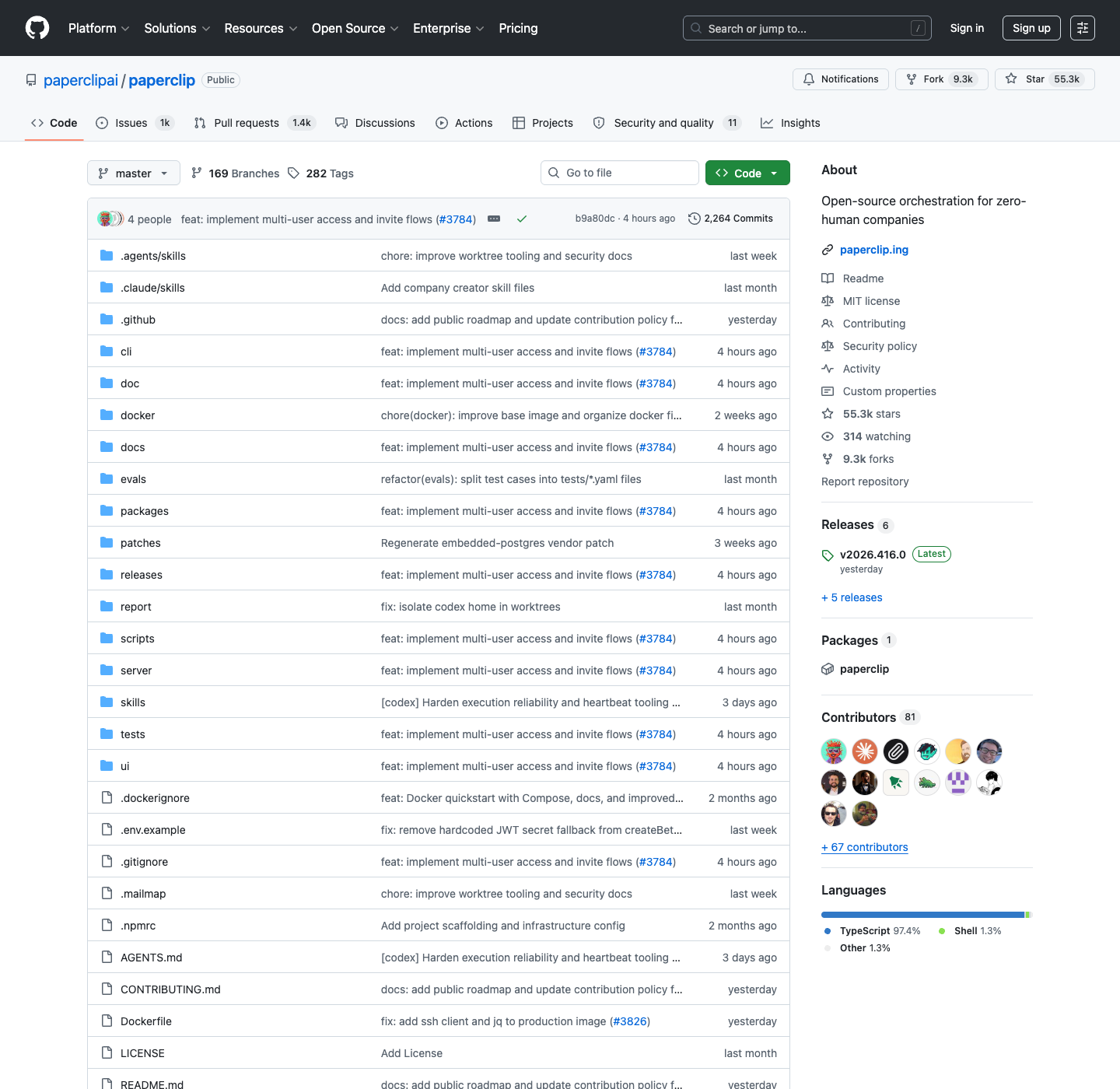
If you have been seeing Paperclip everywhere on GitHub, the shortest explanation is this: Paperclip is not another single-agent prompt runner. It is a control plane for managing a company made of AI agents.
A useful mental model is: if OpenClaw is an employee, Paperclip is the company.
That framing matters. Most agent tools help one model do one job. Paperclip is built for the moment when you have multiple agents, multiple roles, multiple tasks, multiple budgets, and a real coordination problem. Instead of treating agents like isolated bots, it treats them like employees inside an organization with reporting lines, approvals, budgets, and audit trails.
As of April 2026, Paperclip had already crossed 50,000+ GitHub stars, which makes it one of the fastest-moving open-source projects in the AI agent tooling space. But the stars are not the interesting part. The real story is the thesis behind the project: once AI agents start doing real work, orchestration becomes a management problem, not just a prompting problem.
For AnotherWrapper readers, that distinction is especially useful. Paperclip solves the internal coordination layer. AnotherWrapper solves the product layer you still need if those agent workflows have to become a real app with auth, billing, UI, analytics, and users.
Paperclip in one sentence
Paperclip is an open-source, self-hosted operating system for autonomous companies, where AI agents act as employees and the human acts as the board.
That means you can:
- Create a company with a mission and goals
- Hire agents into specific roles like CEO, CTO, engineer, designer, or researcher
- Define who reports to whom
- Assign work as issues and projects
- Enforce per-agent and company-level budgets
- Review approvals before sensitive actions happen
- Watch everything through a dashboard, activity log, and heartbeat history
This is a very different promise from “ask an LLM to do a task.”
Why Paperclip matters
The first wave of agent tooling was mostly about making a single model more useful. Give it tools. Give it a sandbox. Let it browse. Let it code. That worked well enough for demos and local workflows.
But once people started running several agents in parallel, the weak spots became obvious:
- Agents duplicated work
- Nobody knew which task belonged to which agent
- Costs became hard to track
- Context was fragmented across terminals and scripts
- There was no clear approval layer for risky actions
- Debugging autonomous behavior was painful
Paperclip is interesting because it attacks exactly that problem. It asks a more ambitious question: what would software look like if your workforce was mostly AI?
Paperclip’s real innovation is not “AI agents can do work.” We already knew that. The innovation is putting structure around agent work so you can supervise, govern, and budget it like an actual organization.
This is also where the AnotherWrapper angle becomes important. A lot of founders do not just want an AI org chart. They want to turn AI workflows into a sellable product. Paperclip helps you supervise the workforce. AnotherWrapper helps you ship the product surface around that workforce.
What Paperclip actually does
According to the official docs, Paperclip is the command, communication, and control plane for a company of AI agents. In practice, that breaks down into six core capabilities.
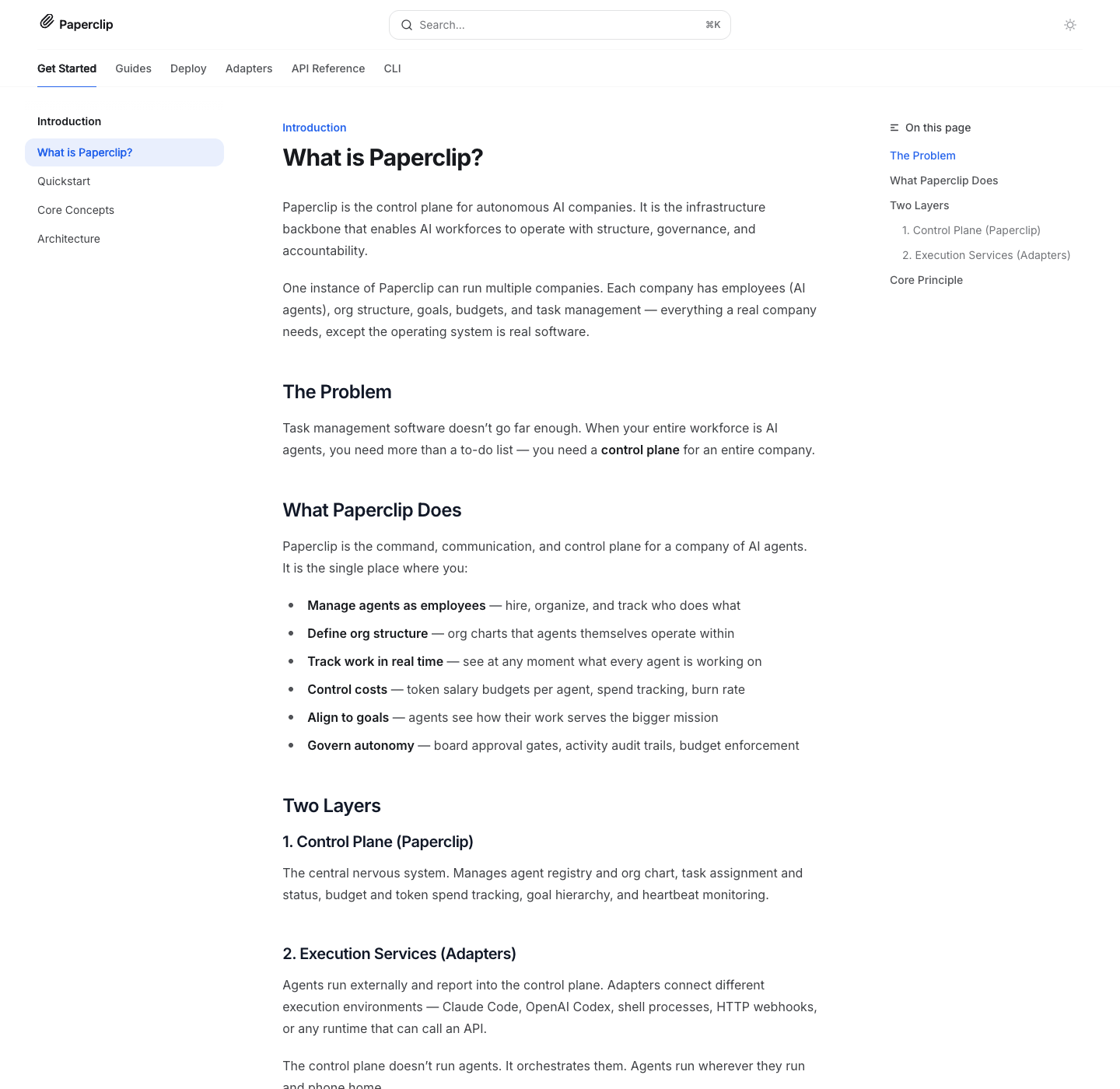
1. It models a company, not just a workflow
Paperclip starts with the concept of a company. A company has:
- A top-level goal
- Employees, where each employee is an AI agent
- An org structure
- A task hierarchy
- A monthly budget
One Paperclip instance can run multiple companies, which is important if you want isolation between projects, teams, or clients.
2. It turns agents into named roles with reporting lines
Each agent has more than a prompt. It has:
- A role and title
- A manager
- A list of capabilities
- A runtime adapter
- A budget
- A state such as active, idle, running, paused, or error
That sounds simple, but it changes how you think about orchestration. Instead of “run a research agent,” you can say “this research lead reports to the CEO, wakes up every hour, has a monthly budget, and only works on tasks in this chain of command.”
3. It manages work through issues and hierarchy
Paperclip uses issues as the unit of work. Each issue has a title, description, priority, status, assignee, and parent relationship. The parent relationship matters because it creates a traceable path from low-level work back to a company goal.
In other words, agents are not just doing tasks. They are doing tasks that can be traced back to why the company exists.
4. It runs on heartbeat execution, not constant autonomous drift
One of Paperclip’s defining ideas is the heartbeat.
Agents do not run forever in an uncontrolled loop. They wake up in short execution windows triggered by a schedule, a new assignment, a mention, a manual invoke, or an approval event.
On each heartbeat, the agent:
- Verifies who it is
- Checks for approvals and assignments
- Picks work
- Atomically checks out a task
- Does the work
- Updates status
- Delegates if needed
That design gives Paperclip tighter cost control and cleaner supervision than always-on agent loops.
5. It enforces budgets and governance
Paperclip is unusually explicit about cost control. The docs describe company-level and agent-level budgets, soft alerts at threshold levels, and hard stops when an agent hits its limit.
It also adds governance:
- Agents can request hires, but humans approve them
- Strategic changes can require board review
- Operators can pause, resume, terminate, or reassign work
- Activity is logged for auditability
This is one of the strongest signals that Paperclip is thinking beyond hobby demos.
6. It stays adapter-agnostic
Paperclip does not need to be the thing that actually runs every agent. The official architecture docs position it as a control plane above execution services.
Built-in adapters include:
- Claude Code CLI
- Codex CLI
- Gemini CLI
- Cursor CLI
- OpenCode CLI
- OpenClaw Gateway
- Shell process adapters
- HTTP webhook adapters
That separation is important. It means Paperclip can orchestrate different agent runtimes without forcing you into a single model vendor or execution environment.
Paperclip architecture, simplified
The official architecture docs break Paperclip into four main layers:
| Layer | What it does |
|---|---|
| React UI | Dashboard, org management, tasks, approvals, visibility |
| Express REST API | Routes, business logic, auth, adapter execution |
| PostgreSQL / PGlite | State, schema, budgets, tasks, runs, audit data |
| Adapters | Launch and interpret actual agent runtimes |
That architecture leads to an important distinction:
| Question | Paperclip answer |
|---|---|
| Who decides what agents should do? | The company structure, issues, and goal hierarchy |
| Who launches the agent runtime? | The configured adapter |
| Where does state live? | In the Paperclip control plane and database |
| Who controls spend and approvals? | The board operator through Paperclip |
Paperclip is best understood as a layer above execution tools. It is not trying to replace every agent runtime. It is trying to supervise them.
Paperclip vs OpenClaw, Claude Code, CrewAI, and LangGraph
This is where a lot of people get confused.
Paperclip is not competing head-on with every agent tool in the same way.
Paperclip vs OpenClaw or Claude Code
OpenClaw and Claude Code are closer to workers. They are the runtimes that do the actual job: coding, reading files, browsing, editing, and responding inside a workspace.
Paperclip is the managerial layer above those workers.
If you want one coding agent in one terminal, Paperclip is overkill. If you want a CEO agent delegating to a CTO agent who delegates to engineering and marketing agents while every run is budgeted and auditable, Paperclip starts making sense.
Paperclip vs CrewAI or LangGraph
CrewAI and LangGraph are more like frameworks for designing workflows and agent graphs in code.
Paperclip is more opinionated. It gives you a business-shaped operating model out of the box:
- Company
- Org chart
- Tasks
- Heartbeats
- Budgets
- Governance
That makes Paperclip easier to grasp if you want a ready-made control plane, but less flexible if your use case is a custom graph with unusual state transitions.
Paperclip vs a product foundation like AnotherWrapper
AnotherWrapper solves a different layer entirely. It helps you ship a customer-facing AI product with auth, billing, database, UI, analytics, and model integrations.
Paperclip helps you coordinate an internal AI workforce.
Those are complementary ideas, not direct substitutes. If you are building an internal AI company, Paperclip is the interesting piece. If you are building the external SaaS wrapper around those workflows, AnotherWrapper is the piece that closes the gap.
How a Paperclip agent run works
The heartbeat protocol is one of the best ways to understand the product.
At a high level:
- A heartbeat is triggered by schedule, assignment, mention, manual invoke, or approval resolution.
- Paperclip launches the configured adapter.
- The adapter starts the agent runtime and injects Paperclip environment variables.
- The agent authenticates with the API and checks its identity.
- The agent fetches assignments and selects work.
- It atomically checks out a task so two agents do not collide on the same issue.
- It reads task context, performs the work, reports usage and cost, and updates status.
- If needed, it creates subtasks for reports lower in the org chart.
That is a much more disciplined loop than the typical “keep prompting until something works” approach.
The atomic checkout piece is more important than it sounds. It is one of the mechanics that turns Paperclip from a fancy dashboard into real multi-agent coordination software.
What Paperclip is good at
Paperclip looks strongest when you need:
- Multi-agent supervision instead of a single autonomous session
- Clear org structure with delegation and reporting lines
- Budget controls around token spend
- Auditability for agent actions and outcomes
- Self-hosting and tight control over infrastructure
- Adapter flexibility across multiple runtimes and providers
The project feels especially well-suited for:
- Founder-led product teams
- AI-native internal operations experiments
- Technical teams building multi-agent workflows
- People who want more structure than a pile of scripts and cron jobs
What Paperclip is not good at
This is the part worth being honest about.
Paperclip is compelling, but it is still early. It is not the same thing as a polished product platform.
Paperclip does not give you:
- A customer-facing SaaS application out of the box
- Built-in monetization or subscriptions
- A finished multi-tenant product layer for end users
- Mature enterprise workflow guarantees everywhere
- A magic solution to agent quality or hallucinations
It can organize agents. It cannot make bad agent decisions disappear. You still have the same core model risk, tool risk, and prompt-design risk as any other agent stack.
How to get started with Paperclip
The official quickstart is refreshingly direct:
npx paperclipai onboard --yesFor local development, the docs say you need Node.js 20+ and pnpm 9+, then:
pnpm install
pnpm dev
Paperclip runs locally with embedded PostgreSQL by default, which removes a lot of setup friction for first-time users.
Once it is running, the suggested next steps are:
- Create your first company
- Define the company goal
- Create a CEO agent
- Configure its adapter
- Add more agents to the org chart
- Set budgets
- Assign initial work
That onboarding sequence is important because it reinforces the central idea: Paperclip wants you to think in terms of operating a company, not just launching a tool.
Paperclip SEO research: what AnotherWrapper should target
I checked live keyword data before writing this piece, and there is an important nuance: the pure brand term is noisy.
“Paperclip AI” overlaps with unrelated projects and broader Paperclip brand confusion, which means a brand-only article is not the best SEO strategy. The stronger approach is to pair the brand with the category and intent.
The best adjacent terms I found in live US/EN DataForSEO results were:
- ai orchestration platform — 480 monthly searches, difficulty 30
- ai agent orchestration platform — 90 monthly searches, difficulty 11
- multi-agent platform — 50 monthly searches, difficulty 17
- multi agent ai platform — 40 monthly searches, difficulty 13
- autonomous ai company — 20 monthly searches, difficulty 49
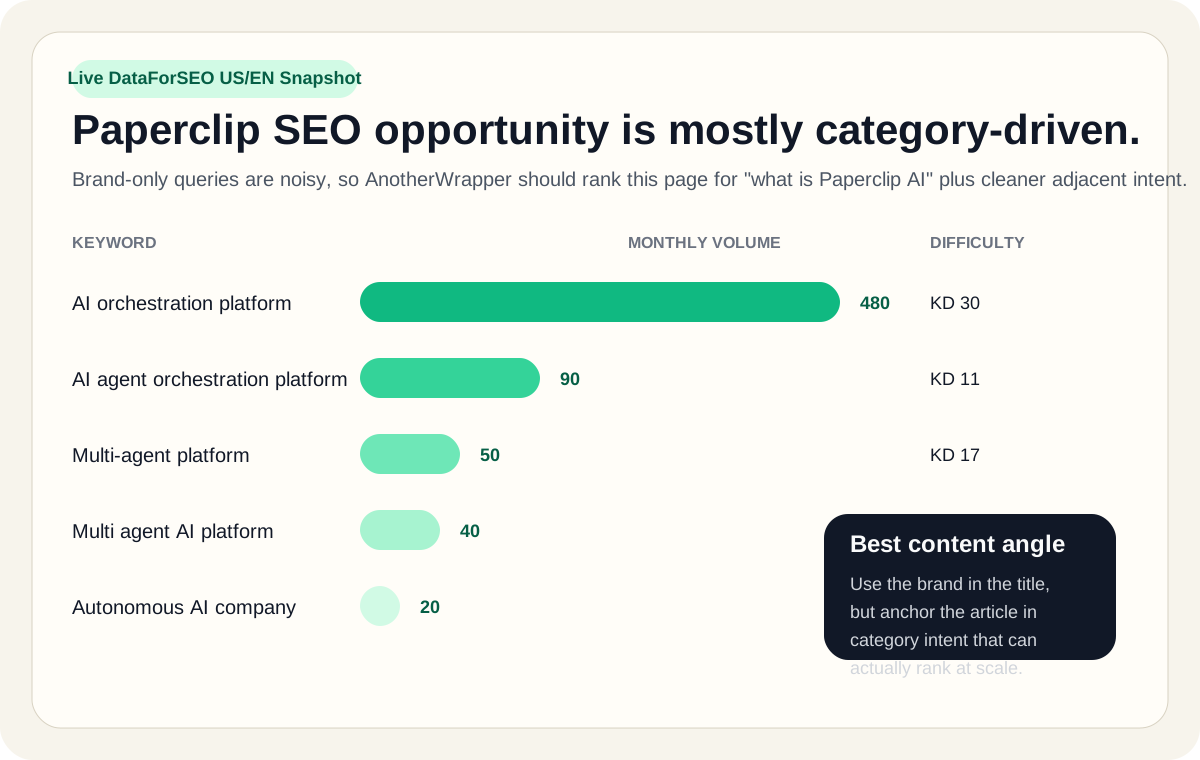
That tells us the ranking strategy should be:
- Capture branded intent with “What is Paperclip AI?”
- Capture category intent with phrases like AI orchestration platform and AI agent orchestration platform
- Explain how Paperclip fits into the broader multi-agent platform landscape
This is why the article title and intro matter so much. The brand gets the click, but the category phrasing broadens the ranking surface.
Articles and resources worth reading about Paperclip
If you want to go deeper after this article, these are the best sources to read:
- The Paperclip GitHub repository for the source code, README, and current project activity
- The official docs on What is Paperclip? for the product thesis
- The official Architecture guide for the control-plane versus adapter model
- The official Core Concepts page for companies, agents, issues, heartbeats, and governance
- The official Heartbeat Protocol page for the agent execution contract
- OSSInsight’s repository analytics for real-time GitHub growth data
- Starlog’s breakdown, Paperclip: Building AI Organizations with Org Charts, Budgets, and Zero Humans, for a sharp outside perspective
- Paperclip’s own blog post, Who Is Actually Using Paperclip on GitHub?, for an interesting look at public adoption patterns
When Paperclip is the right tool
Use Paperclip when:
- You want to coordinate multiple agents, not just one
- You care about governance and cost control
- You want a self-hosted agent management layer
- You like the idea of an org-chart model for delegation
- You need visibility into who did what, when, and at what cost
If your next thought is “great, but I also need a real customer product around this,” that is exactly where AnotherWrapper becomes the better fit for the outer layer of the stack.
When Paperclip is the wrong tool
Paperclip is probably the wrong choice when:
- You only need one agent in one terminal
- You want a simple end-user chatbot
- You need a polished multi-tenant SaaS platform immediately
- You are non-technical and do not want to self-host anything
- You actually need a product stack, not agent supervision software
From the maker
Building an AI product around agents?
Paperclip helps coordinate autonomous agents, but it does not give you the customer-facing product layer. AnotherWrapper gives you auth, billing, database, UI, landing pages, and AI integrations so you can ship the application on top.
“I have finished my MVP. Definitely wouldn't have pulled it off without the demo applications which gave me a kickstart.”

Jonathan
·Founder, Repurpost.io
Verified on DiscordTrusted by 2,000+ founders · One-time payment · Lifetime updates
Final takeaway
Paperclip is one of the more interesting open-source AI projects right now because it reframes the agent problem correctly.
The hard part is no longer proving that one agent can do one task. The hard part is coordinating many agents with enough structure that a real person can trust, govern, and budget the system.
That is the bet Paperclip is making.
If that bet is right, Paperclip will matter because it sits at the layer that most agent stacks still ignore: management. Not prompts. Not demos. Not another flashy wrapper. Management.
And if you are writing about it for SEO, that is exactly the angle worth owning.
Frequently asked questions
What is Paperclip AI in plain English?
Paperclip is software for running and supervising a company made of AI agents. You define the company, create roles, assign work, set budgets, and let the agents operate through controlled heartbeat runs.
Is Paperclip the same thing as OpenClaw?
No. OpenClaw is an execution tool for an individual agent runtime. Paperclip is the control plane above tools like OpenClaw, Claude Code, or Codex. It manages teams of agents instead of acting as just one worker.
Is Paperclip open source and self-hosted?
Yes. Paperclip is open source, MIT-licensed, and designed to run self-hosted. The docs describe local development with embedded PostgreSQL as well as authenticated deployment modes.
Does Paperclip support Codex and Claude Code?
Yes. The official architecture and adapter docs list built-in adapters for Codex CLI, Claude Code CLI, Gemini CLI, Cursor CLI, OpenCode CLI, process-based agents, and HTTP webhooks.
How does Paperclip keep agents from stepping on each other?
Paperclip uses an atomic task checkout flow. Before an agent begins work, it claims the issue. If another agent already owns the task, the second agent gets a conflict and must move on.
Can Paperclip control costs?
Yes. Budget tracking is one of its strongest features. Paperclip tracks spend per company and per agent, warns when budgets are nearly exhausted, and can auto-pause agents that hit hard limits.
Is Paperclip good for production SaaS products?
Not by itself. Paperclip is better understood as orchestration infrastructure for agents. If you want a customer-facing product with auth, billing, and a web app experience, you still need the application layer on top.
What should this article rank for?
The best target is a blend of branded and category-qualified intent: what is Paperclip AI, AI orchestration platform, AI agent orchestration platform, and multi-agent platform.
Related reading on AnotherWrapper:
Stay ahead of the curve
Weekly insights on AI tools, comparisons, and developer strategies.

Fekri
Building tools for the next generation of AI-powered startups. Sharing what I learn along the way.
Continue reading
You might also enjoy

Clawdbot is Now OpenClaw: Migration Guide and What Changed
Clawdbot is now OpenClaw. Learn what changed, how to migrate, and what OpenClaw offers over the original Clawdbot AI agent fork.
 Fekri
Fekri
Moltbot is Now OpenClaw: Migration Guide (2026)
Moltbot is now OpenClaw. Learn what changed, why the rebrand happened, and how to migrate your Moltbot installation to OpenClaw in 5 minutes.
Fekri
What is OpenClaw? The Open-Source AI Agent Framework Explained
OpenClaw is an open-source AI agent framework for building autonomous assistants. Learn how it works, key features, architecture, and when to use it.
Fekri